How to Improve Your Organization's Presence on Google

Did you know that people make 8.5 billion Google searches every day? That equates to around 98,000 searches per second. Imagine the potential this has for your cultural organization!
As the world’s most popular search engine, Google can connect you with new and returning visitors and members. From improving your website’s content to building a complete Google Business Profile, there are many ways to strengthen your organization’s online presence.
Improving your discoverability online will drive ticket sales, membership registrations, and event attendance, so let’s explore practical tips to enhance your organization’s Google presence.
Promote your organization with the Google Ad Grant.
Paid advertising isn’t just for businesses. The Google Ads platform allows nonprofit organizations to run ads that skyrocket important website content to the top of Google Search results. It’s an instant way to enhance your Google Search presence.
Best of all, you don’t even have to pay if you qualify for the Google Ad Grants program. You must be a registered 501(c)(3) organization to participate. However, government organizations, hospitals, healthcare organizations, and schools are automatically ineligible.
Google also has requirements for participants’ websites. Getting Attention’s guide to Google Ad Grants website requirements delves into Google’s website policy, explaining that you’ll need to own your website’s domain, secure it with SSL certification, have limited commercial activity, provide a positive user experience, and host unique content related to your mission.
If you meet the program’s requirements, you’ll receive up to $10,000 per month in ad credits. Use these credits to participate in auctions where you bid against other advertisers for visibility on searches for relevant keywords. If you win, your ad will show to people searching for that keyword. Each time someone clicks your ad, money will be deducted from your ad credits. The cost-per-click varies based on the keyword.
How To Make The Most of Google Ads
While compelling writing is a big part of increasing the click-through rate on your ads, you can drive greater results by taking these steps:
- Target relevant keywords. Research keywords that your audience might search for, such as “museum tickets” or “[city] art exhibits.” Incorporate these keywords into your ad titles, descriptions, and landing pages.
- Use optimized landing pages. Direct ads to optimized pages for events, exhibits, educational programs, or memberships. Ensure these pages are clear, visually appealing, and aligned with ad content.
- Expand your ads with ad assets. Extra elements allow your ads to take up more space on search results pages. For example, use sitelinks to append additional landing pages, call assets to add a button that mobile users can click to call you, and callouts to highlight unique selling points like “Free Guest Passes” or “Award-Winning Exhibits.”
Here’s a hypothetical example of an optimized Google Ad for a museum:
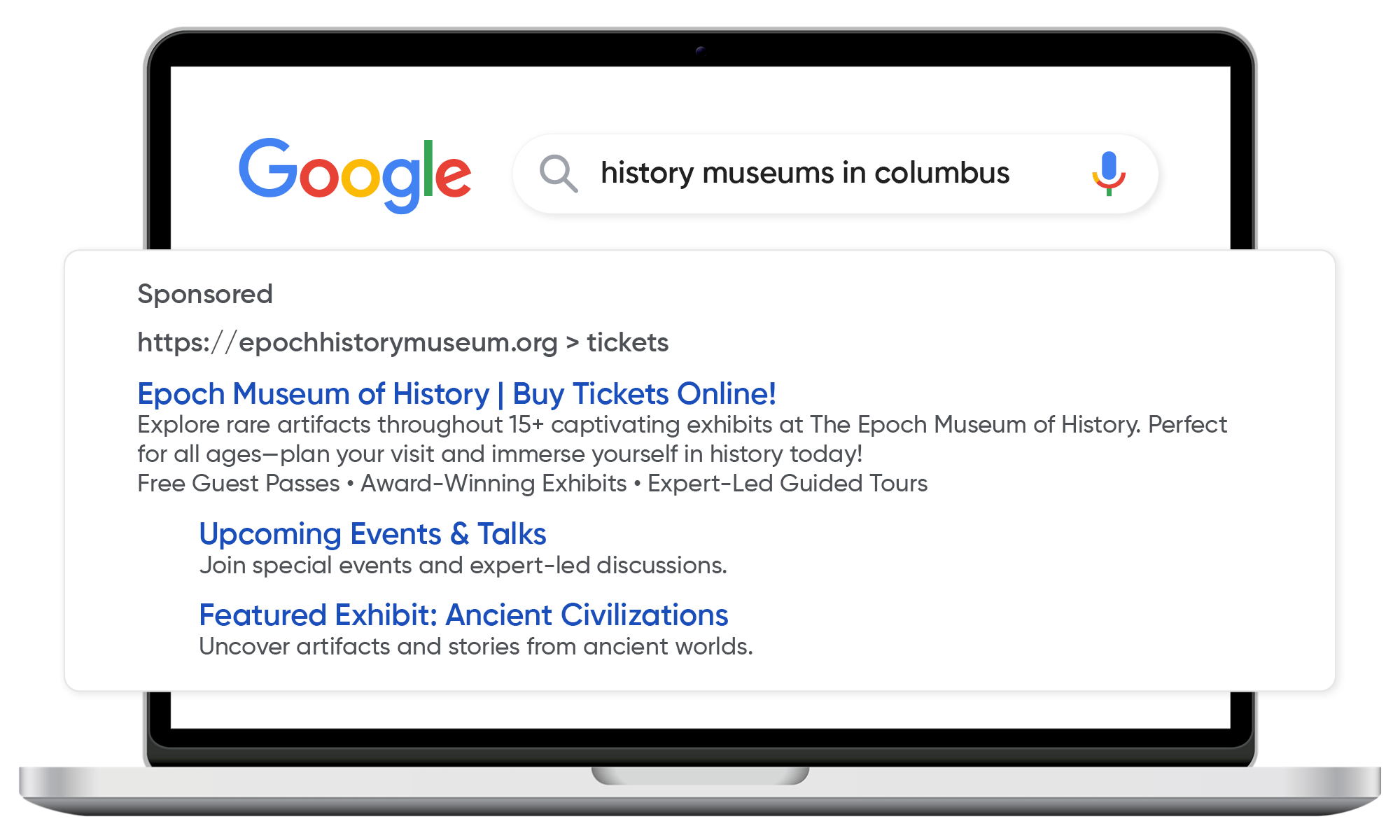
Image Alt Text: A Google Ad for a museum that encourages users to visit
Many organizations hire a Google Grants manager to create effective ad campaigns. A dedicated manager can handle keyword research, ad optimization, and compliance, ensuring your organization makes the most of your budget without needing to allocate precious time to manage the account yourself.
Follow SEO best practices on your organization’s website.
Nexus Marketing’s guide to nonprofit SEO defines SEO as the process of technically maintaining your website and publishing high-quality, keyword-optimized content to improve its visibility in organic search results. By implementing SEO strategies, your museum, zoo, nature center, or other cultural organization can attract more visitors and strengthen its online presence.
Compared to Google Ads, SEO is a long-term approach. While Google Ads effectively promote limited-time offers and events, SEO is better suited for ongoing programming. Ranking organically takes time, but it’s essential for lasting results. Focus on these SEO elements:
- On-Page SEO: Optimize each page’s title tag with primary keywords to improve relevance in search engines. Create compelling meta descriptions that include keywords to encourage clicks, and use keywords in headers to enhance readability and tell Google what your content is about.
- Off-Page SEO Elements: Build high-quality backlinks from reputable websites (e.g., local news and tourism sites) to signal trustworthiness to Google. Positive reviews on platforms like Google, Yelp, or social media also improve your site’s authority.
- Technical SEO: To make your site secure and user-friendly, ensure fast page loading times, mobile responsiveness, and HTTPS encryption. Minimize 404 errors and URL redirects to make it easier for Google to crawl your content and for users to navigate.
Track your site performance with Google Analytics. This tool provides valuable insights into visitor behavior, popular pages, organic traffic, and bounce rates. Reviewing these metrics will help refine your SEO strategy and enhance your site’s visibility and user experience.
Set up a Google Business Profile.
A Google Business Profile (GBP) is a free online listing that allows organizations to manage their presence on Google Search and Maps. Either create your organization’s profile or claim an existing GPB.
To optimize your listing, you should:
- Fill out every possible field with accurate information, including address, hours, contact details, website, and a compelling description of your cultural organization. You can also highlight unique details like notable exhibits, founding date, and CEO.
- Add high-quality images and videos of exhibits, your organization’s exterior, staff, and visitors. This will attract attention and increase clicks on Google Search and Maps. Google users can also upload photos to your GBP.
- Use the Q&A section to answer FAQs about your organization, such as accessibility, admission prices, or exhibit details. Actively respond to questions or add your own questions to address common inquiries.
- Encourage visitors to leave reviews. Then, respond to those reviews to build credibility, establish community trust, and show appreciation for people’s kind words.
Here’s an example of an optimized GBP for The Cincinnati Zoo & Botanical Garden:
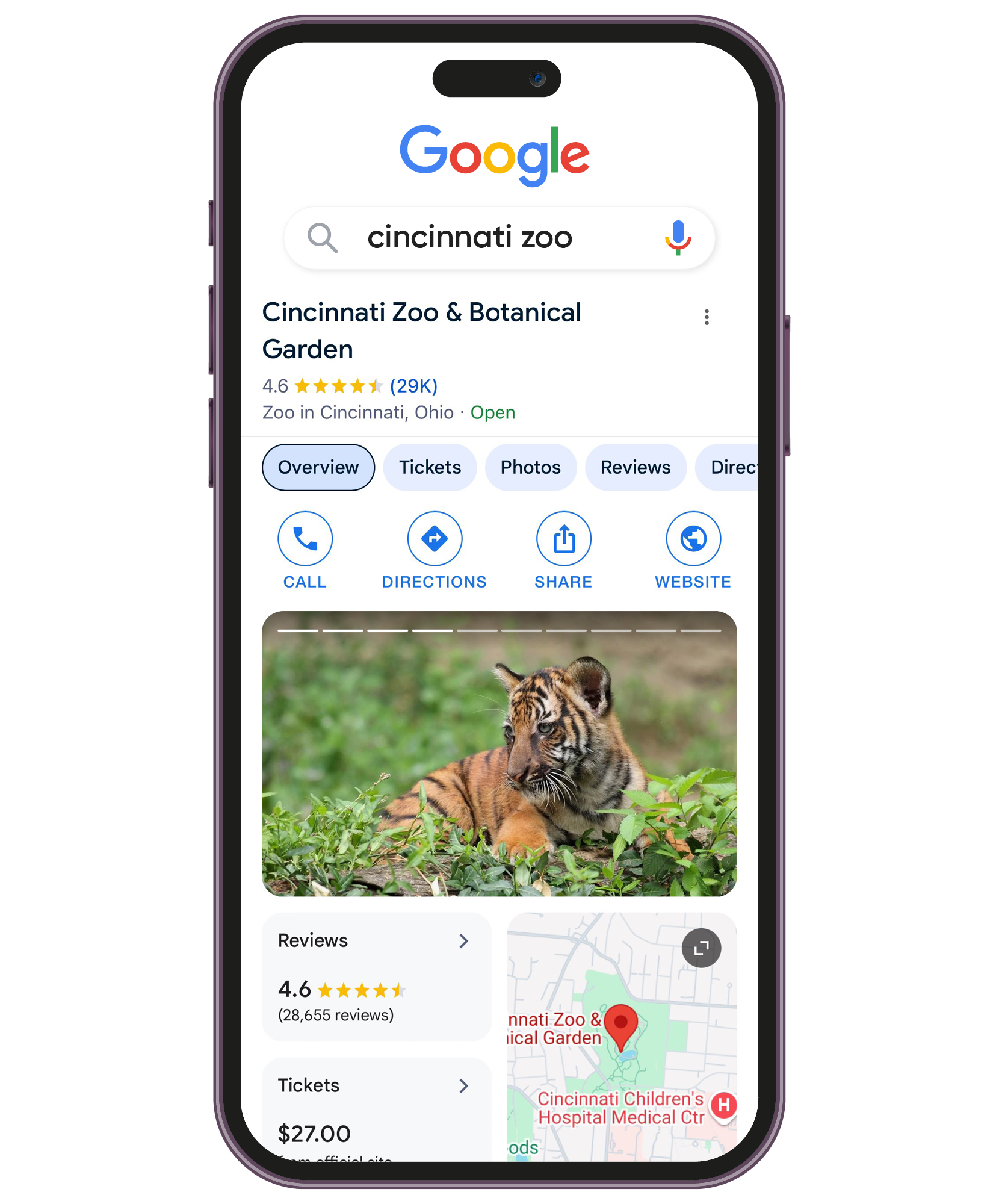
Image Alt Text: A screenshot of The Cincinnati Zoo & Botanical Garden’s Google Business Profile
Although not visible in this screenshot, the zoo’s profile also includes “Popular Times.” Google will generate information like popular times and visit duration for your organization’s profile. You can’t add this information manually. Instead, Google generates details from anonymous data from users who have opted into Google Location History.
Enhance your Google Maps visibility.
When you set up or claim a GBP with an address, Google automatically generates a listing for it on Google Maps. This listing displays the information from your GBP, including your name, address, phone number, hours, and other details.
To verify that your organization is Google Maps, open the app on your smartphone or visit Google Maps on your computer. If your organization appears when you search its name, you’re good to go! If not, you may need to add your organization manually by selecting the “Add a missing place” option.
From here, follow these tips to improve your visibility on Google Maps:
- Regularly update your GBP. Any updates you make to your profile—like adding photos, changing hours, or posting updates—are reflected in real-time on your Google Maps listing. Keep your listing fresh with new events, exhibits, seasonal hours, or special offers.
- Respond to reviews. In the context of Google Maps visibility, actively managing reviews signals community trust and popularity to Google’s local search algorithm. This ongoing engagement improves your ranking in Google Maps and gives users insight into your visitor and member experience.
- Add location-based keywords to your profile and posts. Use local keywords naturally in your description and website’s posts, such as “art museum in [city].” Google Maps prioritizes listings that are relevant to local searches, so emphasizing your location can help you appear to nearby users.
- Add your own Google Street View imagery. Make your listing even more engaging by adding a virtual tour of your facilities or exhibits. For example, The Decorative Arts Center of Ohio worked with a vendor to create Google Street-style virtual tours throughout their museum, offering online users an immersive look into the space and exhibit.
A well-maintained Google Maps listing can drive foot traffic by providing users with accurate information and a seamless way to find directions, contact details, and visitor insights. It also simply makes a good impression on visitors, giving them everything they need to plan their visit and showing them that your institution is active and modern.
Building a strong Google presence is essential for attracting visitors to your cultural organizations. By taking advantage of free ads, following SEO best practices, and optimizing your Google Business Profile and Maps presence, your organization can reach more community members.
While some strategies, like maintaining your GBP, are low maintenance, others, such as SEO, require ongoing effort. Together, these practices create a well-rounded approach that enhances your visibility.